January 23rd, 2025 | Posted in Retirement, Tools
Find out how much money you will receive from the Canadian retirement benefits programs (CPP and OAS). Continue reading»

January 23rd, 2025 | Posted in Retirement, Tools
Find out how much money you will receive from the Canadian retirement benefits programs (CPP and OAS). Continue reading»

April 27th, 2024 | Posted in Data & Insights, Tools
Tracking housing market affordability in Canada through home prices, incomes and mortgage rates. Data on 14 cities from 1999 to 2024. Continue reading»

October 15th, 2023 | Posted in Data & Insights, Tools
Tracking Canadian rent prices, incomes, and rental affordability by city -- over time from 1992 to 2022. Continue reading»

May 4th, 2023 | Posted in Data & Insights, Tools
Measuring Canadian food price inflation using 110 grocery items. Prices over time, prices by category, and your personal inflation rate. Continue reading»

January 7th, 2023 | Posted in Tools
Does timing the market beat time in the market? Use this interactive simulator to find out. Continue reading»

June 29th, 2019 | Posted in Tools
A small yet mighty tool for figuring out how much you need to save, when you'll reach your goal, and how much money you'll have at the end of it all. Continue reading»
While a journey of a thousand miles begins with a single step, the path to wealth begins with a budget.
Your budget will serve as the foundation for the rest of your financial plan — reducing debt, saving money, and investing to build wealth.
Before we get too far, what exactly is a budget? While there are many ways of looking at it, I define a budget as a document that shows:
Having a budget doesn’t mean that you need to penny-pinch, cut back on all of your expenses, or stop buying coffee in the morning. It just means that you know your current financial trajectory, and whether that trajectory will lead you to where you’d like to be in the future.
Everyone needs a budget. Those living paycheck-to-paycheck can use a budget to identify places where spending can be cut back. Those who already manage to save money each month can use a budget to plan for goals such as buying a house, saving for a child’s education, or retirement.
Before we decide on where we want to go and how to get there, we need to know where we’re standing first.
Pause for a moment here and try to estimate how much money you spent last month.
If you don’t track your budget regularly, this question is probably quite difficult to answer without relying on a wild guess.
Most people have a good idea of how much they spend on recurring bills (rent, utilities, gym, internet, etc.) but are surprised when they see the actual numbers on their total, all-inclusive spending. It adds up fast — the lunches out, weekend trips, drinks with friends, small purchases here and there…
I find that most people (myself included) tend to have “recurring one-time expenses” (which may seem like an oxymoron). The new shirts you bought last month or the weekend trip you took the month before might be “one-time” expenses that won’t come up again for a while, but for most people a new type of “one-time” expense seems to always pop up to take its place (celebratory dinner? replacing your laptop? a new couch?).
If you want to have an accurate view of your typical spending habits, it’s important that you track your spending in detail on a regular basis.
All that to say: to make progress in your financial life, you need to have a strong grasp on your cash inflows and your cash outflows.
Let’s stop beating around the bush. How do you actually go about creating a budget?
I’ve built a spreadsheet which allows you to record your earning & spending data, set future budgeting goals, and visualize your cash inflows / outflows in a dashboard. Grab a copy of that budgeting spreadsheet here, and read through the post for a tutorial on how to use the tool.
It’s time to go back in your personal history so that you can piece together a picture of your earning and spending habits.
Log in to each of your bank accounts / credit card accounts, and export your transaction data into spreadsheet form. Every bank is different, but they’ll all offer some kind of excel, spreadsheet, or “CSV” download option (CSV stands for “Comma Separated Values”, and these files can be opened in any spreadsheet program).
As an example, my checking account at TD bank allows me to export my transactions in “CSV” format.
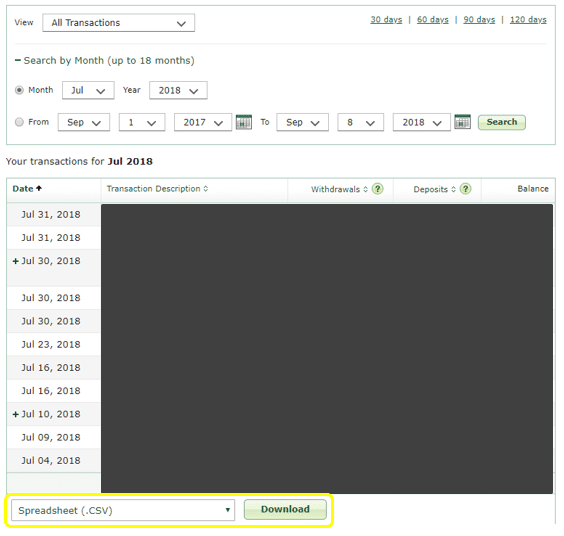
I recommend going back in time by at least 3 months. 6 months would be better, and 12+ months would be best. The goal is to cover a time period that will reflect your normal spending habits.
Once you have everything downloaded, put these transactions into the “expenses” and “income” tabs of the budget tracking spreadsheet linked above, as appropriate.
Afterwards, you’ll need to add a category label (e.g., groceries, rent, utilities, public transportation, etc.) beside each of your transactions.
Although this can be a time consuming exercise (especially when you’re just starting out and entering in multiple months), putting in the effort to understand your current financial habits will pay off again and again. I can’t stress how important this is to do — grab your drink of choice, settle in, and make it happen!
Personally, I update my spreadsheet once every couple of months, and it takes me 20-30 minutes each time — including the time spent reviewing (geeking out over) the outputs.
Switch over to the “Dashboard” tab of the spreadsheet. You’ll see your results visualized in a few different ways: total income / spending / saving over the entire time period, your numbers broken down by individual category, and your monthly results over time.
Ask yourself these questions:
Take your time to get acquainted with the results. Maybe some of this is unexpected. If so, just keep in mind that being aware of your habits has already put you in a much stronger position to deal with this in the future.
You’ve just taken a huge step towards being conscious and in control of your money.
Now that you know what your current trajectory looks like, you can set goals for the future.
Navigate to the “Budget Targets” tab of the spreadsheet. Here, you can enter in targeted goals for each of your income and expense categories. If you’re comfortable with where you’re at, feel free to set your targets at a similar level to where you are today. If you’d like to cut back on some spending categories, you’ll be able to set those goals here.
There are many different budgeting styles, and as time goes on you’ll likely settle into a preferred setup.
Some people use an “envelope” budgeting method. To do this, you set aside specific dollars for each spending category (e.g., $300 for groceries, $100 for eating out, $50 for clothing), and you commit to spending no more than that amount of money for each category. If you run out of money mid-month, you stop spending on that category — no ifs, ands, or buts. This method is quite strict, but can be helpful for those who have trouble controlling their spending. Check out Dave Ramsey’s guide to the envelope method.
Others are much more flexible with their budgeting system, and allow themselves to spend on anything they want, as long as they meet an overall savings goal. Let’s say your take-home pay is $3,000 per month, and your goal is to save 15% of your salary — $450 per month. This means that you can spend at most $2,550 during the month. How you spend that $2,550 is totally up to you.
It’s entirely up to you how you go about it. Choose the envelope method, choose the overall savings goal method, or go with something in between. As long as you have a goal to work towards, you’re good to go.
Once you have your budget goals worked out, make sure that you stick with the process by making budgeting a part of your routine. Your budget should be a living document that you update and re-visit on a regular basis.
By committing to a regular budgeting routine, you’ll motivate yourself to make improvements and meet your goals. It will also force you to face up to your bad habits — the data won’t lie.
Decide on the frequency at which you’ll update and review your budget. I suggest that you do it once a month (or more frequently) until you get a hang of it.
Each time you sit down to budget, just follow those same steps listed above:
Budget once, budget twice, budget ’till your money’s nice. Then budget once more…

August 14th, 2018 | Posted in Tools
An interactive web tool to chart out your net worth over time under different scenarios. Use this calculator for quick and easy projections. Continue reading»

June 12th, 2018 | Posted in Tools
The cost of raising a child will differ greatly from one family to another. Use this spreadsheet to estimate the cost of raising your little bundle of joy. Continue reading»
May 2nd, 2018 | Posted in Retirement, Tools
How much money do I need to retire? How long will it take me to get there? How much will I need to save and how do my investments need to perform? This tool will help you understand all of the above. Continue reading»
April 12th, 2018 | Posted in Tools
Keeping track of your budget (how much you make and how much you spend) is the most important step towards taking control of your financial well-being. Get access to a simple tool to track and visualize your budget here. Continue reading»